Here you’ll find step-by-step guides for memberships, suite access, and proper equipment use.
We recommend scheduling a tour to learn how to sign up, operate the machines, use our 24/7 access system, and pick up your access fob.
Membership Sign Up
Not a self-learner? Schedule a tour to sign up.
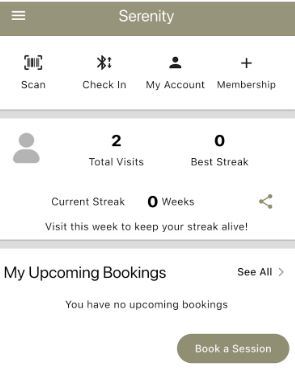
To self-sign up, please download the Serenity Bookings App or the GymMaster Member App from your app store.

Click join club.
Salt Sauna Light Co. will populate.
Select membership, package, or single session option.
Enter personal information, read and sign the waivers, and pay for the selected service options.
Schedule a booking
In the Serenity Bookings App or GymMaster Member app, select “Book a Session.”
Choose either the HaloRed O₂ Room or the Infrared Sauna Room.
Scroll down to view additional available dates and times. When you find a time that works for you, select “Join Booking” and then “Confirm Booking.”
You will receive a confirmation email, and your reservation will appear under “My Upcoming Bookings.”
Accessing Salt Sauna Light Co.
After hours and weekends: If the exterior door is locked, please check your booking email or text reminder for code
Interior Suite Access:To enter the suite, scan your access fob on the fob reader shown or open the app and select “Check In.”
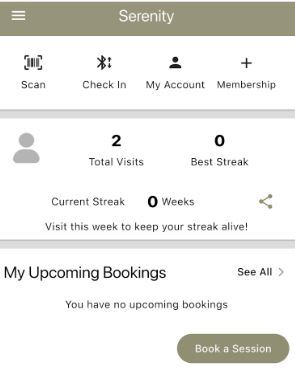
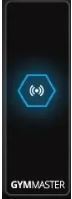
If you are experiencing Bluetooth connection issues, it may help to unselect “Automatically Pick the Closest Door.” Because the door readers are located close together, your Bluetooth signal may connect to the wrong reader and display a “Denied Entry” message.
FOB Return Policy
Members and package holders are responsible for returning their assigned FOB within 14 days of membership or package expiration. Failure to return the FOB within this timeframe will result in a $10.00 replacement fee charged to the card on file.
HaloRed 02
Presession
Remove garments as you feel comfortable—more skin exposure enhances red light and salt benefits. Use the provided eyewear for red light sessions.
No street shoes, food, or beverages allowed in the booth.
Machine Operation
To begin your session, gently rotate the timer dial to your desired session length (up to 30 minutes). Activating the timer will automatically turn on both the halogenerator and red light panels. Your session will run for the selected time and shut off automatically when complete.
If the halogenerator is not active (green light not illuminated or no sound from the grinder), switch it from OFF to ON. PLEASE DO NOT TOUCH THE SALT LEVEL KNOB. THIS IS PRESET BASED ON HUMIDITY.
If the red light panels are not illuminated, switch them from OFF to ON..

For salt therapy only:
You can shut off the Red Light by pressing the button to the “O” -off position.

For Red Light only:
You can shut off the salt generator by pressing the button on the generator to the “O”.
PLEASE DO NOT TOUCH THE SALT LEVEL KNOB. THIS IS PRESET BASED ON HUMIDITY.

Protocols
Red Light Only
Turn off the Halotherapy switch. Start with 10 minutes and gradually increase to 20 minutes over the next 3 sessions (max 20 minutes).
Halotherapy Only
Turn off the red light switch. Turn the timer for 20–30 minutes. Ensure the green light is on the halogenerator.
Halotherapy & Red Light together
20 minutes max red light, then turn the red light off and enjoy 10 additional minutes of salt.
Oxygen
Turn the power on. Set the flow to 1 for the maximum concentration. Set the timer for 15–30 minutes. Ensure concentration is off after your session.
Post - Session Cleaning
Please use the provided cleaner to spray a towel, then wipe down all chairs and high-touch surfaces after each use with our disinfecting spray and wipes. Place dirty linens in the basket, eyewear in the bin, and dispose of trash properly.
Sauna Guidelines
Pre-session
Remove garments as you feel comfortable—greater skin exposure enhances infrared benefits. Place a towel over the bench before use. Use a face towel to wipe sweat during your session, and a body towel or wrap for added comfort as needed.
Turn on chromotherapy to enhance your session via the wall remote.
No street shoes, food, or beverages are permitted in the Sauna.
Session Protocols
Protocol Selection
End the current preheat session. Select one of the custom-built protocols. No need to preheat when prompted.
Music
Press the home button on the tablet. Open Pandora and search for your preferred music or choose a pre-created relaxation station.
Contridications
Always seek medical clearance for any health concerns.
Post Session
-Use the provided wood cleaner—spray onto a towel, then wipe down the bench, backrest, footrests, and any sweat spots on the floor
-Place all used linens in the designated basket
-Dispose of trash properly
-Turn off the chromotherapy lighting using the remote
-Ensure the sauna door is closed to allow proper preheating for the next guest
-Do NOT turn off the tablet in the sauna.
-Hydrate
-Shower after you have naturally cooled down to help wash away sweat and eliminated toxins.
